
Motion (by Mosaic) review: features, pricing, pros and cons

Motion (by Mosaic)
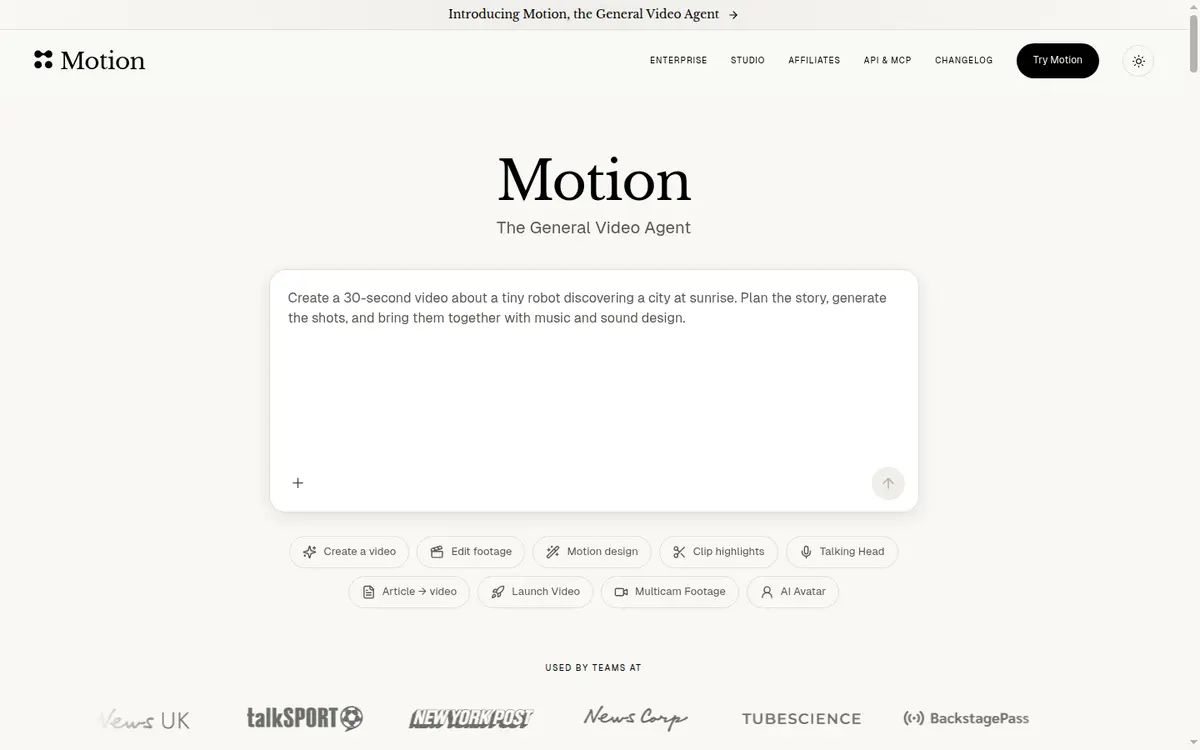
A general video agent that plans, builds and checks a video from an idea, your footage or a reference.
The short answer
Best for: Teams making launch videos, motion design, talking-head edits and podcast clips who want an agent plus export to pro editors.
Free plan: None listed; Flex credits are pay-as-you-go with no subscription.
What Motion (by Mosaic) does
- Visuals: Your footage, images and brand assets, AI images and video, web assets, and Getty when you connect your own Getty account; AI avatars.
- Script and voice: Works from a brief, an article, your footage or a reference; AI voiceovers, music and sound effects.
- Editing: Edit by chat, by drawing on the preview or on a timeline; exports to After Effects, Premiere Pro, DaVinci Resolve, Remotion and Hyperframes.
- Longest video: not stated on its site.
- Free plan: None listed; Flex credits are pay-as-you-go with no subscription.
Motion (by Mosaic) pricing
Motion (by Mosaic) pricing
Flex
See its site
$6 for 200 credits, no subscription, credits never expire
Pro
$29.00/mo
From 1,000 credits a month; bundles up to 50,000 credits, 3 or more seats
Enterprise
See its site
Custom, for teams needing 50,000+ credits a month
From Motion (by Mosaic)'s pricing page, checked Nov 21, 2026. Prices change; check their site before you buy.
Motion (by Mosaic) pros and cons
Pros
- Exports to After Effects, Premiere Pro, DaVinci Resolve, Remotion and Hyperframes
- Automations that run on a schedule or when a new YouTube video lands
- Schedules posts to many networks, including Instagram, YouTube, TikTok, LinkedIn and X
- Pay-as-you-go credits with no subscription on Flex
- An API and MCP connector for building it into other tools
Cons for faceless YouTube
- Credit cost varies with engine, effort, length and generated media, so the price per video is not fixed
- Getty footage needs your own connected Getty account
- Its site does not state a maximum video length or supported languages
How Motion (by Mosaic) compares with VidEdge
We make VidEdge, an AI tool for faceless YouTube, so here is where the two differ.
| Feature | Motion (by Mosaic) | VidEdge |
|---|---|---|
| Starts at | $29.00/mo | $79.99/mo |
| Longest video | Not stated | 60 min |
| Makes Shorts | Yes | Yes |
| Real footage of your subject | Your own footage | Yes |
| AI-generated visuals | Yes | Yes |
| AI avatars | Yes | Yes |
| Languages | Not stated | 6 |
| Free plan | Not stated | No |
- VidEdge is built for faceless YouTube storytelling: it writes the script from an idea, narrates it and finds real footage of the actual people, places and events in it.
- VidEdge makes long-form videos up to 60 minutes plus Shorts, and quotes a price per finished minute (from $1.55 for Real Footage) instead of credits that vary by engine and effort.
- VidEdge includes faceless channel research: a Niche Finder with 8,000+ niches, video ideas and a Chrome extension.
Frequently asked questions
What is Motion (by Mosaic)?
A general video agent that plans, builds and checks a video from an idea, your footage or a reference. Best for: Teams making launch videos, motion design, talking-head edits and podcast clips who want an agent plus export to pro editors.
How much does Motion (by Mosaic) cost?
Motion (by Mosaic)'s paid plans start at $29.00 a month (checked on its pricing page). Free plan: None listed; Flex credits are pay-as-you-go with no subscription.
Is Motion (by Mosaic) good for faceless YouTube?
Exports to After Effects, Premiere Pro, DaVinci Resolve, Remotion and Hyperframes The main limits for faceless YouTube: credit cost varies with engine, effort, length and generated media, so the price per video is not fixed; getty footage needs your own connected getty account.
What are the alternatives to Motion (by Mosaic)?
See our list of Motion (by Mosaic) alternatives. For faceless YouTube specifically, VidEdge is one: VidEdge is built for faceless YouTube storytelling: it writes the script from an idea, narrates it and finds real footage of the actual people, places and events in it.
Want to see what VidEdge makes from your idea?
Type an idea and VidEdge writes, voices, finds the footage and edits it into a finished video. Cancel anytime.
Make your first videoRelated
- Motion (by Mosaic) vs VidEdge
- Motion (by Mosaic) alternatives
 VidEdge review: features, pricing, pros and cons
 VidRush: features, pricing and reviews
 InVideo AI: features, pricing and reviews
 Pictory: features, pricing and reviews
 Fliki: features, pricing and reviews
 Revid.ai: features, pricing and reviews
 AutoShorts.ai: features, pricing and reviews
 Faceless.video: features, pricing and reviews
 Steve AI: features, pricing and reviews
 HeyGen: features, pricing and reviews
Motion (by Mosaic) is a trademark of its owner. VidEdge is not affiliated with it. Facts about other products come from their own websites on the date shown; if something here is out of date, email [email protected] and we will correct it.